How to Use Your WaveSync Mind Training Device
Everything included in your system and how to set up your glasses and headphones in under a minute.
WaveSync System Contents
Your complete WaveSync Mind Training kit includes:
- 1. The WaveSync Brainwave Entrainment Console (35 Pre-Programmed Sessions in 6 Folders)
- 2. Eyes-Closed Glasses (Full-Field Relaxation Frame)
- 3. Eyes-Open Glasses (See-Through Frame)
- 4. Stereo Ear-Bud Style Headphones
- 5. USB Charging Cable & Wall Adapter
- 6. Protective Carrying Case

Your Two Pairs of Glasses: Eyes-Closed vs. Eyes-Open
Each system includes two pairs of glasses so you can choose between deep eyes-closed relaxation or daytime eyes-open focus:

Eyes-Closed Glasses
Designed for deep relaxation, stress relief, meditation, and bedtime sessions. Wear these while seated comfortably in an armchair or lying in bed with your eyes gently closed. If the light feels too bright at first, simply press the - brightness button on the right side of your console.
Use ONLY when relaxing in a stationary position.
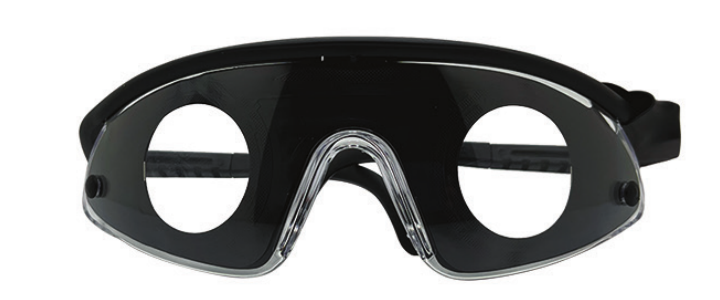
Eyes-Open Glasses (See-Through)
These have open viewing windows so you can see normally while using them. They are ideal when you want to perform calm tasks while using your system—such as reading, working on the computer, studying, watching TV, or doing light chores. Do NOT use them while driving or operating dangerous equipment.
Console Diagram & Step-by-Step Guide
WaveSync Quickstart Diagram
Port Tip: Both the earbuds and the glasses plug into the bottom of the WaveSync unit (earbuds on the left, glasses on the right).
Running a Session
To Turn On
Press and hold the button on the very top-right of the unit for 1 second until the WaveSync screen appears.
Navigating the Menu
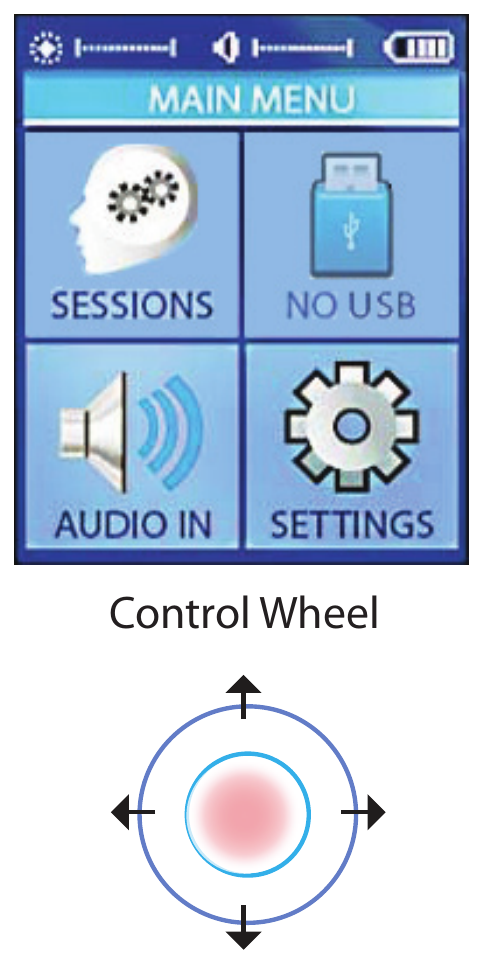
Once the main menu appears, SESSIONS is selected by default. Use the round dial (Control Wheel) by pressing top, bottom, left, or right to move, and press the middle of the wheel to select. Press the left side of the wheel once to go back one level.
Selecting & Playing a Session
Press the middle of the wheel on SESSIONS to see the list of folders. Highlight any folder and press the middle of the wheel to open it. Highlight your session and press the middle of the wheel to start—it will count down from 10 seconds and auto-play (or press the middle of the wheel once more to start immediately).
Adjusting Volume & Brightness
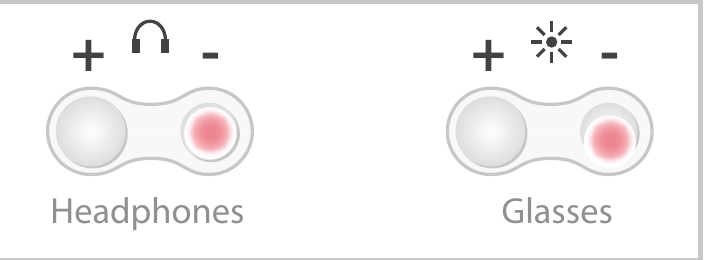
Once a session starts, the lights and sounds will begin. Use the + or - buttons on the left for headphone volume and on the right for glasses brightness. If this is your first time using the lights, we suggest starting at half intensity (50%) and adjusting to your comfort.
Automatic Light Colors & Sleep Protection
Each WaveSync session is automatically programmed with the best light colors for every stage. As a rule, never use green or blue light for sleep or bedtime sessions—blue and green light interferes with natural sleep rhythms, whereas warm red light does not disturb melatonin production.
Troubleshooting & Safety Guidelines
Troubleshooting Steps
Battery Charge & Cable Connections
The 2 most common problems are a discharged battery or cables connected to the wrong sockets by mistake. Make sure your unit is charged, and verify that the earbuds are connected to the BOTTOM-LEFT port and the glasses are connected to the BOTTOM-RIGHT port. (The jack on the TOP of the machine is only for mixing external audio.) Remember that you must start a session before the lights and sound turn on.
Power Cycle & Recharging
Try turning the unit off by holding the power button for several seconds, unplugging the USB cable, and turning the unit back on. Recharge the unit for an hour if the battery level is low.
Factory Reset
If needed, you can perform a factory reset: turn the device completely off. Then turn the unit on while holding down both the volume down (-) and brightness down (-) buttons simultaneously, then press the center button when text appears on the screen. If you are still having issues, please contact the clinic you received your unit from for support.
Important Safety & FDA Wellness Information
FDA Wellness Guidelines & Disclaimer
Information on the FDA guidelines for this type of general wellness device can be found at: FDA General Wellness Policy for Low-Risk Devices.
This device is intended for use as a tool for relaxation, focus, and personal wellness. It is not intended for use as a medical, diagnostic, or therapeutic device, and no medical claims of any sort are made for it. The information contained on this site is for educational purposes and is not intended to diagnose, treat, or cure any disease.